Mining Bitcoin With GPU
Let’s cut right to the chase: you can’t profitably mine Bitcoin directly with a GPU anymore. While your high-end gaming rig might feel like a powerhouse, it was effectively kicked out of the Bitcoin mining game years ago by hyper-specialized hardware. Trying to mine Bitcoin with a GPU today is like entering a Formula 1 race with a go-kart—you’ll burn a lot of fuel and fall hopelessly behind.
This guide will walk you through why that is and, more importantly, what you can do instead to use your GPU to acquire Bitcoin.
Why Your Gaming PC Can’t Compete
So, what changed? In a word: ASICs.
The rise of Application-Specific Integrated Circuit (ASIC) miners completely rewrote the rules of Bitcoin mining. These aren’t just powerful computers; they are single-purpose machines built from the ground up to do one thing and one thing only: execute Bitcoin’s SHA-256 hashing algorithm at blistering speeds.
A good way to think about it is comparing a versatile Swiss Army knife (your GPU) to a dedicated industrial-grade power tool (an ASIC). The knife can do a lot of things reasonably well, but if your only job is to drill through concrete, the specialized drill will do it thousands of times faster and more efficiently. For Bitcoin mining, ASICs are that specialized drill.
The Unwinnable Arms Race: Hashrate and Efficiency
Success in mining boils down to two key factors: hashrate (the sheer speed of your calculations) and energy efficiency (how much power you use to get the job done). On both of these critical fronts, ASICs have an insurmountable lead.
- A Grand Canyon-Sized Hashrate Gap: A modern, mid-tier ASIC miner measures its power in terahashes per second (TH/s)—that’s trillions of calculations every second. The most powerful consumer GPU, on the other hand, struggles to produce a hashrate measured in megahashes per second (MH/s), or millions of hashes. Since one terahash is equal to one million megahashes, the performance gap isn’t just large; it’s astronomical.
- Electricity Costs Will Crush You: Because ASICs are custom-built for the job, they convert every watt of electricity into hashing power with incredible efficiency. A GPU, being a general-purpose processor, wastes a massive amount of energy trying to perform the same task. The electricity bill from a GPU attempting to mine Bitcoin would quickly exceed the value of any crypto it managed to find.
This isn’t a new development. The shift happened a long time ago. Between 2010 and 2013, GPUs were indeed the kings of the hill, representing a huge leap over CPU mining. But by 2014, the first ASICs hit the market, offering over 100 times the hashrate of a multi-GPU rig while using less power. That was the moment the game changed for good, a fascinating transition you can read more about on Wikipedia’s page on GPU mining.
GPU vs. ASIC: A Bitcoin Mining Performance Snapshot
To put the performance chasm into perspective, let’s look at a side-by-side comparison. This table pits a top-of-the-line consumer GPU against a fairly standard, mid-range ASIC miner.
| Metric | High-End GPU (e.g., NVIDIA RTX 4090) | Mid-Range ASIC (e.g., Antminer S19 Pro) | Winner |
|---|---|---|---|
| Algorithm | General-purpose, not optimized for SHA-256 | Optimized exclusively for SHA-256 | ASIC |
| Typical Hashrate | ~1,200 MH/s (0.0012 TH/s) | 110 TH/s | ASIC |
| Power Consumption | ~350 Watts | ~3,250 Watts | GPU (uses less) |
| Efficiency (Joules/TH) | ~291,667 J/TH | ~29.5 J/TH | ASIC |
| Profitability | Highly unprofitable (loses money daily) | Profitable (depending on electricity cost) | ASIC |
The numbers don’t lie. The Antminer S19 Pro is over 91,000 times faster and nearly 10,000 times more energy-efficient at mining Bitcoin than the RTX 4090. This isn’t just a small advantage; it’s total dominance, making any attempt to compete with a GPU a guaranteed financial loss.
In summary: The core issue is specialization. ASICs were designed for a single task (mining SHA-256) and do it with unmatched speed and efficiency, making it impossible for general-purpose GPUs to compete on the Bitcoin network.
How ASICs Permanently Changed The Game
To really get why mining Bitcoin with a GPU is a non-starter today, you have to look at the tech that holds the network together. Bitcoin runs on a cryptographic algorithm called SHA-256. You can think of it as an incredibly specific and difficult mathematical puzzle.
In the very early days, a powerful graphics card was pretty good at chipping away at these puzzles. Its ability to perform many calculations in parallel gave it a massive leg up on standard CPUs. But the game completely changed when hardware was developed for one purpose and one purpose only: solving that exact SHA-256 puzzle. This is the fundamental divide between a GPU and an ASIC.
The Rise of Specialized Hardware
An Application-Specific Integrated Circuit, or ASIC, is a microchip built from the ground up for a single job. It doesn’t render graphics, run Windows, or browse the web. Its entire design is ruthlessly optimized to execute the SHA-256 algorithm as fast and as efficiently as possible.
This specialization created a performance gap that can never be bridged. A GPU is like a decathlete—good at many different things. An ASIC, on the other hand, is an Olympic sprinter who only trains for the 100-meter dash. In the race to mine Bitcoin, that’s the only event that matters.
This timeline shows just how quickly the landscape shifted from early GPU viability to today’s complete ASIC dominance.
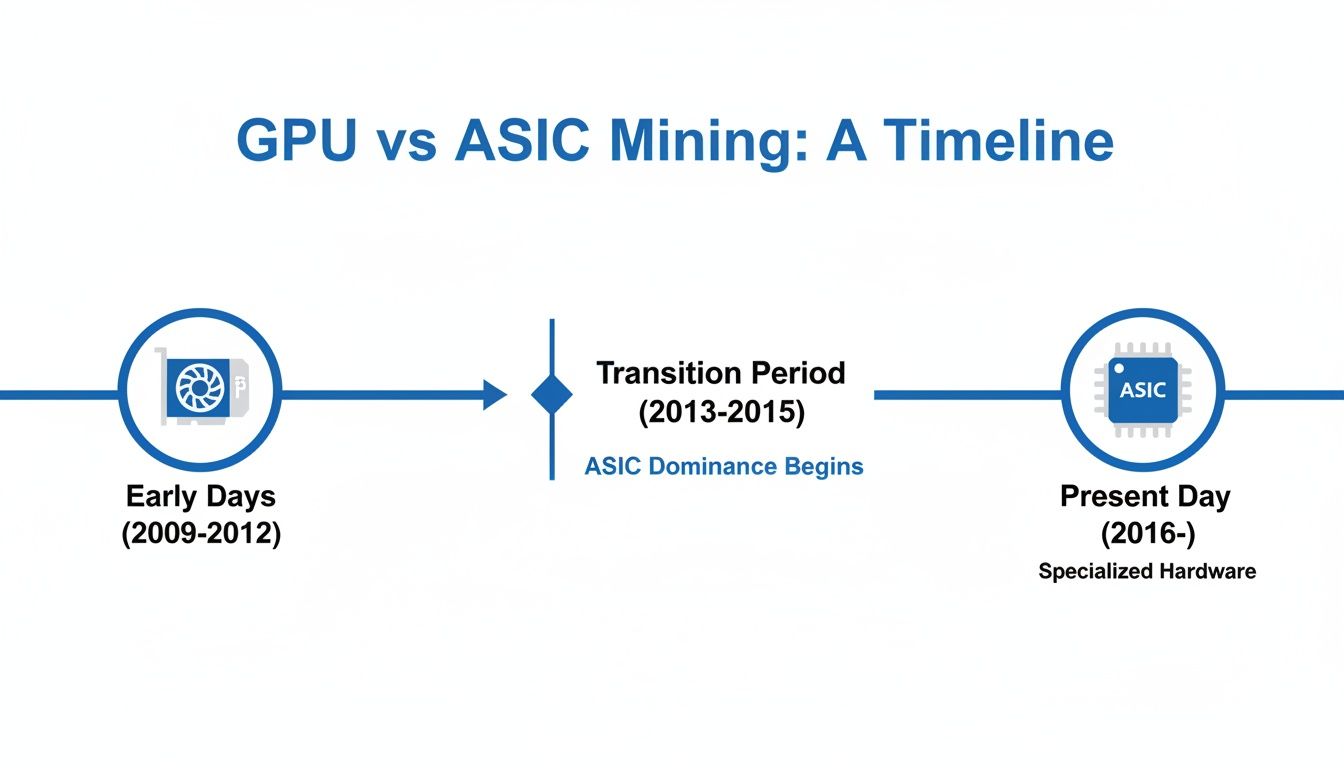
As you can see, it didn’t take long for specialized hardware to make general-purpose GPUs totally obsolete for securing the Bitcoin network.
Bitcoin’s Self-Adjusting Difficulty
The final nail in the coffin for GPU mining is Bitcoin’s brilliant, built-in network difficulty adjustment. The protocol is engineered to find a new block—and release the associated BTC reward—roughly every 10 minutes. This timing stays consistent whether a handful of people are mining or millions are.
To keep this 10-minute schedule, the difficulty of the SHA-256 puzzle automatically readjusts every 2,016 blocks, which is about every two weeks.
- More Hash Power Joins: If the network’s total computing power (hashrate) goes up and blocks are found faster than 10 minutes, the difficulty increases to slow things down.
- Hash Power Leaves: Conversely, if miners shut off machines and blocks are found more slowly, the difficulty decreases to make it easier.
When ASICs hit the scene, the global hashrate didn’t just climb; it exploded. This forced the network difficulty to skyrocket to levels that are now mathematically impossible for any GPU to compete with.
That massive GPU mining boom from 2017 to 2021, where miners reportedly spent $15 billion on graphics cards, wasn’t for Bitcoin. They were focused entirely on other cryptocurrencies, because Bitcoin was already long out of reach. You can find a deeper analysis of these market-moving events over at Market.us.
To conclude: A GPU’s hashrate is now a statistically irrelevant drop in an ocean of ASIC-driven computation. The network’s self-adjusting difficulty ensures it will stay that way.
The Modern Strategy: Mine Altcoins And Convert To Bitcoin
So, we’ve established that trying to mine Bitcoin directly with your graphics card is a financial dead end. But that doesn’t mean your powerful GPU has to collect dust. Savvy miners haven’t given up; they’ve just pivoted.
The most practical and profitable approach today is to mine GPU-friendly alternative cryptocurrencies—altcoins—and then trade those earnings for Bitcoin. This lets you play to your hardware’s strengths while still working toward your goal of stacking sats. Think of it as using your GPU as a value-generation engine, which you then convert into the asset you actually want.
Why This Indirect Approach Actually Works
Unlike Bitcoin’s SHA-256 algorithm, which is completely cornered by ASICs, many altcoins use different hashing algorithms designed to be “ASIC-resistant.” These algorithms are often memory-intensive, a characteristic that perfectly suits the architecture of a consumer-grade GPU.
This built-in resistance levels the playing field, creating an environment where GPUs can still compete and, more importantly, turn a profit. You’ll frequently run into GPU-friendly algorithms like these:
- kHeavyHash: Used by Kaspa (KAS), this algorithm has become a favorite for its incredible performance on modern GPUs.
- KawPow: The engine behind Ravencoin (RVN), which changes its properties over time specifically to deter the development of ASICs.
- Autolykos2: The algorithm for Ergo (ERG), engineered for high efficiency on graphics cards.
- Ethash/Etchash: The classic memory-hard algorithm originally from Ethereum, now used by coins like Ethereum Classic (ETC).
When you mine coins built on these algorithms, your GPU is up against similar hardware—not purpose-built machines that are thousands of times more powerful.
Finding The Most Profitable Coin To Mine
The crypto market is notoriously volatile. The altcoin that’s most profitable to mine this week could be a dud next month. This is where profitability calculators become an indispensable part of any GPU miner’s toolkit.
Websites like WhatToMine are a game-changer. You just plug in your GPU model and electricity cost, and it generates a real-time, ranked list of the most profitable coins you can mine right now. This data-driven strategy eliminates the guesswork and helps you maximize your potential returns.
Once you’ve mined some altcoins, the next step is swapping them for Bitcoin. It’s a straightforward process:
- Get a Wallet: First, you’ll need a secure wallet for the altcoin you’re mining.
- Point Your Miner: Configure your mining software to deposit your earnings into that wallet’s address.
- Send to an Exchange: After you’ve mined a decent amount, transfer the coins to a reputable cryptocurrency exchange.
- Trade for BTC: On the exchange, simply execute a trade from your altcoin to Bitcoin.
- Secure Your Bitcoin: Finally, withdraw the BTC from the exchange to a personal, secure wallet where you control the private keys.
Key Takeaway: The strategy isn’t to just mine any random altcoin. It’s about consistently finding and mining the most profitable coin for your specific hardware and electricity rate, and then systematically converting those earnings into Bitcoin.
Comparing Popular GPU-Mineable Coins
To give you a clearer picture of the landscape, here are a few popular altcoins that are still great candidates for GPU mining. Remember, profitability is constantly shifting, so treat this as a starting point for your own research. You can dig deeper by checking our detailed guide on the most profitable altcoins to mine for the latest data.
Here’s a breakdown of common altcoins that are still profitable to mine with GPUs, including their hashing algorithms and typical compatible hardware.
| Cryptocurrency | Mining Algorithm | Best Suited For (NVIDIA/AMD) | Example Use Case |
|---|---|---|---|
| Kaspa (KAS) | kHeavyHash | Performs well on both, but NVIDIA often leads. | Ideal for miners seeking high throughput and efficiency on newer GPUs. |
| Ravencoin (RVN) | KawPow | Generally favors NVIDIA cards due to core performance. | A popular choice for those wanting an established, ASIC-resistant project. |
| Ergo (ERG) | Autolykos2 | Very efficient on both, AMD often has a slight edge. | Good for miners focused on low power consumption and long-term potential. |
| Ethereum Classic (ETC) | Etchash | Performs well on GPUs with at least 6GB of VRAM. | A stable option for those with older-generation high-VRAM cards. |
Ultimately, succeeding at mining Bitcoin with a GPU today is a game of strategy, not brute force. By intelligently mining the right altcoins and converting them, you can absolutely use your gaming rig or mining farm to grow your Bitcoin holdings.
A Practical Guide to Firing Up Your GPU Miner
Alright, so we’ve settled on the modern game plan: mine profitable altcoins and swap them for Bitcoin. Now for the fun part—actually getting your hardware up and running. Setting up a GPU mining rig for the first time can feel a bit daunting, but it really just boils down to a few key stages: hardware setup, software installation, and pool connection.
Let’s walk through a real-world example to keep things grounded. We’ll set up an NVIDIA RTX 3070 to mine Kaspa (KAS), a coin that’s been very popular with GPU miners. The process is nearly identical for other coins and cards, just with a few tweaks here and there.
Step 1: Dialing in Your Hardware and Drivers
Before a single hash is calculated, your rig needs to be stable. A solid mining operation is built on a foundation of reliable hardware and the correct drivers—get this part wrong, and you’ll be chasing down problems for days.
- Physical Setup: Ensure your GPU is seated correctly and has plenty of power and cooling. Mining is a marathon, not a sprint; your card will be running at full tilt 24/7. Good airflow isn’t just a suggestion, it’s mandatory to prevent your card from overheating and throttling its own performance. If you’re building a rig with multiple cards, our GPU mining rig guide has some great tips on assembly and layout.
- Driver Installation: Using the right drivers is what lets your mining software unlock the full power of your GPU.
- NVIDIA GPUs: Head straight to NVIDIA’s website and grab the latest “Game Ready” or “Studio” drivers. A clean installation is recommended to avoid any conflicts.
- AMD GPUs: Go to AMD’s official site and download the most recent Adrenalin Edition drivers.
Outdated or generic drivers are probably the number one cause of weird errors and disappointing hashrates.
Step 2: Picking and Configuring Your Mining Software
The mining software is the engine of your operation. It’s the program that communicates with the mining pool, grabs hashing jobs for your GPU to solve, and sends the finished work back to get you paid. Which software you choose usually comes down to what brand of GPU you’re running.
A few of the community’s go-to miners are:
- T-Rex Miner: A beast for NVIDIA cards. It’s known for squeezing out great performance and has solid developer support.
- TeamRedMiner: The top choice for most AMD users, especially those with newer RDNA or older Vega cards.
- lolMiner: Super flexible. It supports both NVIDIA and AMD, which makes it perfect if you’re running a mixed-brand rig.
For our RTX 3070 mining Kaspa, T-Rex Miner is the perfect fit. To get it working, you just need to edit a simple batch file (a .bat file in Windows or a .sh file in Linux). This file holds the command line that tells the miner exactly what to do.
Here’s what a typical configuration looks like for mining KAS on the WoolyPooly pool:t-rex.exe -a kheavyhash -o stratum+tcp://pool.woolypooly.com:3112 -u YOUR_KASPA_WALLET_ADDRESS -p x -w rig001
Let’s quickly decode that:
-a kheavyhash: This tells the miner to use the Kaspa algorithm.-o stratum+tcp://...: This is the mining pool’s server address.-u YOUR_KASPA_WALLET_ADDRESS: Your personal wallet address. This is where your rewards go!-p x: The password. For most pools, you can just leave this as ‘x’.-w rig001: This is just a name for your rig (e.g., “rig001”) so you can easily identify it on the pool’s dashboard.
Pro Tip: Never download mining software from a random link. Always go directly to the official source, like the developer’s GitHub page or their announcement thread on the BitcoinTalk forum. Shady downloads are often packed with malware that can drain your wallet.
Step 3: Connecting to a Mining Pool and Getting Paid
Just like with Bitcoin, trying to solo mine an altcoin is a losing game unless you have a massive amount of hashrate. You could run your rig for years and never find a block on your own. This is exactly why mining pools exist. They let thousands of miners like you pool their resources.
By combining your hashrate with everyone else’s, the pool finds blocks consistently. The rewards are then split among all contributors based on the amount of work they did. It turns a lottery ticket into a steady, predictable paycheck.
Choosing the right pool is a big decision. Here’s what to look for:
- Pool Fee: Most charge between 0.9% and 2%. A lower fee is nice, but I’d rather pay a little more for a pool that’s stable and reliable.
- Payout Threshold: How much do you have to mine before they send it to your wallet?
- Server Location: Pick a server that’s physically close to you. Lower latency (ping) means fewer stale shares and more efficient mining.
- Reputation and Uptime: Go with a pool that has a proven track record. Downtime means you’re not earning anything.
Once you’ve made your choice, just copy the pool’s server address (like the WoolyPooly one from our example) and paste it into your miner’s batch file. The last, and most important, step is to double-check, then triple-check your wallet address. One typo, and your crypto will be sent into the void, lost forever.
Save the file, run it, and you should see a command window pop up as your GPU starts hashing. Congratulations, you’re officially mining!
Getting a Real-World Look at Your Profitability
Jumping into mining without crunching the numbers is a surefire way to turn a potential investment into an expensive hobby. To figure out if GPU mining is a smart move or just a money pit, you have to get honest about the costs. A setup that looks profitable on paper can quickly bleed money if you underestimate your single biggest expense: electricity.
This isn’t about wild guesses; it’s about a clear-eyed breakdown of every single variable. Your potential earnings are constantly at odds with your running costs. Let’s dig into the critical factors you absolutely need to track.
The Metrics That Actually Matter
Before you can punch numbers into a calculator, you need to gather the right data. While software can give you a ballpark figure, nothing beats real-world measurements for true accuracy, especially when it comes to power consumption.
- GPU Hashrate: This is the raw horsepower your GPU brings to a specific algorithm. You can find solid estimates for your card on sites like WhatToMine or by checking benchmarks from the mining software itself.
- Power Consumption: This is the big one. Measure the total power draw from the wall for your entire rig while it’s mining. A simple Kill A Watt meter is perfect for this job.
- Electricity Cost: Pull out your utility bill and find your exact cost per kilowatt-hour ($/kWh). This number is a game-changer.
- Mining Pool Fees: It might seem small, but the 0.9% to 2% fee most pools charge will eat into your margins over time.
- Crypto Price & Network Difficulty: These two are a moving target and can change in an instant.
The Bottom Line: Your electricity cost is the undisputed king of this equation. You can make up for a lower hashrate with cheap power, but even the most powerful GPU in the world can’t outrun an expensive electricity bill.
A Back-of-the-Napkin Profit Calculation
Let’s walk through a practical example. Say you’re using an NVIDIA RTX 3070 to mine Kaspa (KAS).
First, we nail down our core stats:
- GPU: NVIDIA RTX 3070
- Algorithm: kHeavyHash
- Hashrate: ~550 MH/s
- Power Draw (from wall): 180 Watts (which is 0.18 kW)
- Electricity Cost: $0.12/kWh (a common US average)
- Pool Fee: 1%
Now, let’s see what it costs to run this thing for a day.
- Daily Power Usage: 0.18 kW × 24 hours = 4.32 kWh
- Daily Electricity Cost: 4.32 kWh × $0.12/kWh = $0.52
Okay, so we know our daily cost is about fifty cents. What about revenue? This part requires checking live network data, but for our example, let’s assume today’s numbers show an RTX 3070 can mine roughly 7 KAS per day, with Kaspa trading at $0.15.
- Gross Daily Revenue: 7 KAS × $0.15/KAS = $1.05
- Pool Fee Cost: $1.05 × 0.01 = ~$0.01
- Net Daily Revenue: $1.05 – $0.01 = $1.04
With all the pieces in place, we can find our actual profit:
- Daily Net Profit: $1.04 (Net Revenue) – $0.52 (Electricity Cost) = $0.42
In this scenario, we’re in the green. But watch what happens if your electricity cost was $0.25/kWh. Your daily cost would skyrocket to $1.08, instantly putting you at a daily loss. This simple math shows just how much your profitability hinges on power costs and the volatile crypto market.
To stay on top of these shifting numbers without doing manual calculations every day, it’s wise to use a tool built for the job. You can learn more about how to use a dedicated crypto mining profitability calculator to get automated, up-to-date insights.
Frequently Asked Questions (FAQ)
Can I actually mine Bitcoin with my gaming PC?
Technically, yes, you could force a GPU to run the SHA-256 algorithm that Bitcoin uses. However, in practice, it’s completely and utterly unprofitable. You would spend a fortune on electricity to earn a fraction of a penny. The only realistic way to get Bitcoin from a GPU is the indirect route: mine a profitable, GPU-friendly altcoin and then trade those earnings for BTC.
What is the best GPU for altcoin mining in 2024?
There’s no single “best” GPU, as its performance depends on the algorithm, its price, and its power efficiency.
- NVIDIA cards (e.g., RTX 30 and 40 series) tend to excel on newer, core-intensive algorithms.
- AMD cards often offer a great balance of value and efficiency, especially on memory-heavy algorithms like Etchash (Ethereum Classic).
The key metric is efficiency (hashrate per watt), not raw speed. A mid-range card with low power draw can often be more profitable long-term than a top-tier, power-hungry model.
How do services like NiceHash fit into this?
Services like NiceHash offer a more hands-off approach. Instead of choosing a coin and pool yourself, you are essentially renting your GPU’s hashing power to a marketplace. The NiceHash software automatically mines the most profitable algorithm for your hardware at any given moment, and you get paid directly in Bitcoin. It’s a fantastic, beginner-friendly way to accumulate Bitcoin with your GPU without managing multiple wallets and exchanges.
Is GPU mining still worth it?
Yes, it can be, but only if you have the right conditions. Profitability depends almost entirely on:
- Low electricity costs: This is the most critical factor.
- Efficient hardware: A GPU that delivers a high hashrate for every watt consumed.
- A strategic approach: Mining the most profitable altcoins and monitoring the market.
It is no longer a passive “set it and forget it” activity for most people.
How much electricity does a mining rig use?
A single high-end GPU can easily draw 200-450 watts while mining. When you include the rest of the computer (CPU, motherboard, fans), a simple one-GPU setup could be drawing 400-600 watts from the wall. You must measure this yourself with a power meter (like a Kill A Watt device) to accurately calculate your costs and potential profit.