F2Pool
F2Pool, established in 2013, is one of the most renowned and long-standing mining pools. This guide will explain what F2Pool is, how to join it, and provide a detailed examination of its profitability and fee structure. You will also find instructions for login and wallet setup.




| Currency | Profit per day | Price | Pool hashrate | Network hashrate | Number of miners | Current difficulty | ||
|---|---|---|---|---|---|---|---|---|

BTC
HTR, ELA, NMC, FB
|
$0.032373/Th | 68 879 $ | 105.04 Eh/s | 926.10 Eh/s | - | 133.79 Th/s | Read more | |
|
Hashrate chart for 7 days
|
||||||||

LTC
DOGE, BELLS, LKY, PEP, JKC, DINGO, SHIC, CRC, TRMP
|
$0.07188/Gh | 54.70 $ | 721.90 Th/s | 3.10 Ph/s | - | 95.68 Mh/s | Read more | |
|
Hashrate chart for 7 days
|
||||||||

DOGE
LTC
|
$0.07188/Gh | 0.091546 $ | 721.90 Th/s | 3.08 Ph/s | - | 48.72 Mh/s | Read more | |
|
Hashrate chart for 7 days
|
||||||||

KAS
CAU
|
$0.07188/Th | 0.036050 $ | 66.14 Ph/s | 415.34 Ph/s | - | 20.22 Ph/s | Read more | |
|
Hashrate chart for 7 days
|
||||||||

ETC
|
$0.000512/Mh | 8.20 $ | 82.55 Th/s | 215.56 Th/s | - | 2.76 Ph/s | Read more | |
|
||||||||
ETHW
|
$0.000512/Mh | 0.271848 $ | 702.65 Gh/s | 3.74 Th/s | - | 50.15 Th/s | Read more | |
|
Hashrate chart for 7 days
|
||||||||

ALEO
|
$0.000512/Mh | 0.059466 $ | 822.74 Gh/s | 2.70 Th/s | - | 40.50 Th/s | Read more | |
|
Hashrate chart for 7 days
|
||||||||

BCH
|
$0.031813/Th | 458.66 $ | 189.97 Ph/s | 6.25 Eh/s | - | 880.19 Gh/s | Read more | |
|
Hashrate chart for 7 days
|
||||||||

CKB
|
$7.8E-5/Gh | 0.001433 $ | 45.27 Ph/s | 114.86 Ph/s | - | 1.48 Eh/s | Read more | |
|
Hashrate chart for 7 days
|
||||||||

KDA
|
$0.003631/Th | 0.007150 $ | 0.00 h/s | 25.59 Ph/s | - | 38.39 Ph/s | Read more | |
|
Hashrate chart for 7 days
|
||||||||

CFX
|
$0.002577/Mh | 0.061985 $ | 436.79 Gh/s | 2.76 Th/s | - | 1.38 Th/s | Read more | |
|
Hashrate chart for 7 days
|
||||||||

ALPH
|
$0.002577/Gh | 0.059265 $ | 4.13 Ph/s | 7.93 Ph/s | - | 282.04 Th/s | Read more | |
|
Hashrate chart for 7 days
|
||||||||

NEXA
|
$0.002577/Mh | 0.000000 $ | 3.25 Gh/s | 3.10 Th/s | - | 85.06 kh/s | Read more | |
|
Hashrate chart for 7 days
|
||||||||

SC
|
$0.36/Th | 0.001022 $ | 8.00 Ph/s | 11.66 Ph/s | - | 7.00 Eh/s | Read more | |
|
Hashrate chart for 7 days
|
||||||||
ZEC
|
$0.026771/kh | 222.17 $ | 1.96 Gh/s | 11.29 Gh/s | - | 109.82 Mh/s | Read more | |
|
Hashrate chart for 7 days
|
||||||||

Dash
|
$0.001676/Gh | 31.56 $ | 904.99 Th/s | 2.57 Ph/s | - | 152.26 Mh/s | Read more | |
|
Hashrate chart for 7 days
|
||||||||
What is F2Pool?
Before we explore how F2Pool operates, let’s first take a look at its history, key characteristics, and the advantages it offers. Whether you’re wondering where F2Pool is located or how to set it up, this guide has you covered.
The Story Behind F2Pool
This pioneering pool was launched in response to the rise of ASIC miners, which quickly made GPU mining less competitive.
Key Features and Advantages
F2Pool stands out by offering a robust set of features designed for both novice and experienced miners:
- Flexible Payout System: Caters to various risk appetites and income stability preferences with multiple transaction options, flexible payout thresholds, and manual or automatic withdrawals.
- Merged Mining: Allows you to mine multiple cryptocurrencies simultaneously, optimizing profitability.
- Vardiff Algorithm: Dynamically adjusts mining difficulty to ensure efficient operation and fair reward distribution based on each user’s hashrate.
- Comprehensive Monitoring & Analytics: Provides all the statistics needed to monitor performance and optimize operations.
- User-Friendly Interface: Designed for a seamless and intuitive user experience.
- Mobile Management: Dedicated mobile apps for iOS and Android for monitoring on the go.
- Wide Coin Support: Supports a vast range of over 30 different cryptocurrencies.
- Extensive Learning Resources: Detailed guides and tutorials for setup and advanced optimization.
- Additional Tools: Access to a suite of extra tools and services to enhance mining activities.
Server Locations and Global Infrastructure
F2Pool’s globally distributed server infrastructure ensures low latency, allows miners to seamlessly switch locations to bypass restrictions, and helps the service comply with regional regulations.

Merged Mining at F2Pool
F2Pool supports merged mining for several blockchain networks, allowing you to mine a primary and an auxiliary coin simultaneously without extra computational effort.
| Primary Coin | Auxiliary Coins (Mined Simultaneously) |
|---|---|
| Bitcoin | FCH, Hathor, Namecoin, Elastos |
| Litecoin | Dogecoin, Bellcoin, Pepecoin, Luckycoin, Jackpotcoin, Dingocoin, Shicoin |
| Kaspa | Canxium |
How It Works and Its Benefits
Merged mining lets you earn rewards on a secondary blockchain while mining your primary coin. This is a way to increase your overall profitability without increasing your hashrate or electricity costs.
Example: When you mine Bitcoin at F2Pool, you can simultaneously earn Hathor tokens.
How to Access Your Merged Mining Rewards
To receive and manage rewards from auxiliary coins (like Hathor in the example above), follow these steps:
-
Get a Compatible Wallet: You must have a wallet address for the auxiliary coin.
For Hathor, you can create one on Hathor’s official wallet
or use a supported exchange like KuCoin. -
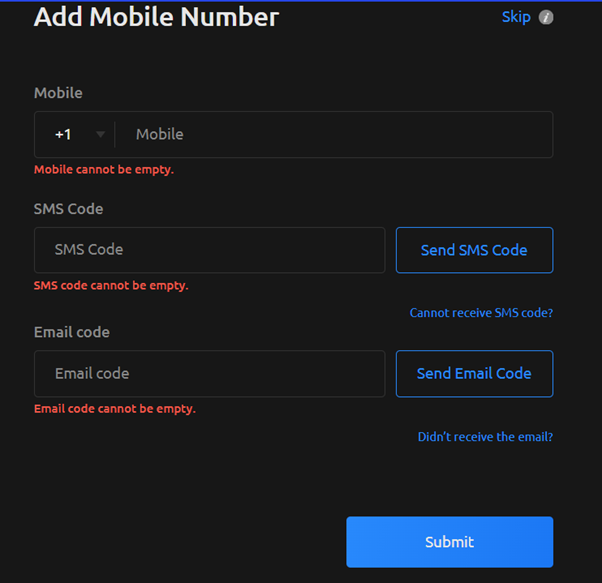
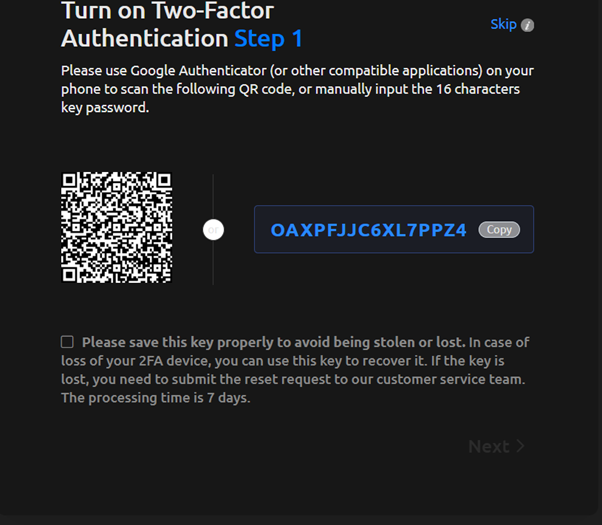
Secure Your F2Pool Account: To access withdrawal features, you must secure your F2Pool account:
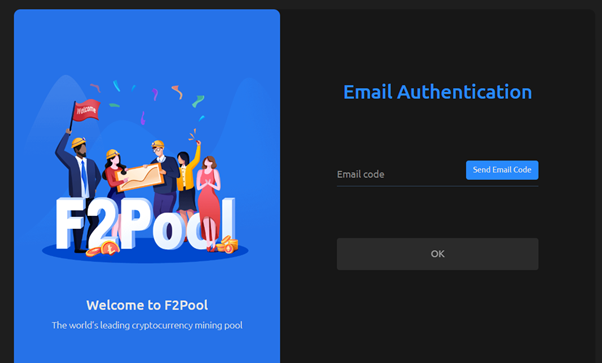
- Use SMS verification or enable Two-Factor Authentication (2FA) for stronger protection.
-
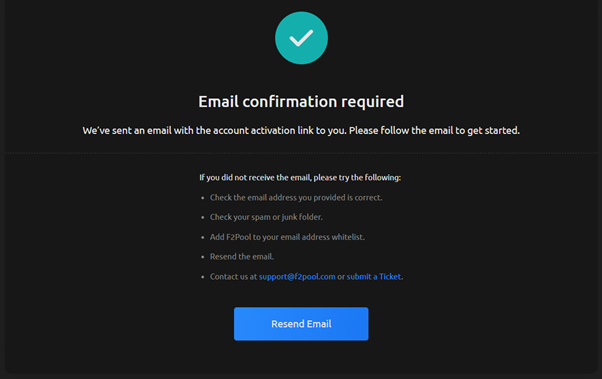
Verify Your Email: During registration, you will receive a verification link.
You must click it to activate your profile and access all platform features.
Account Registration and Setup
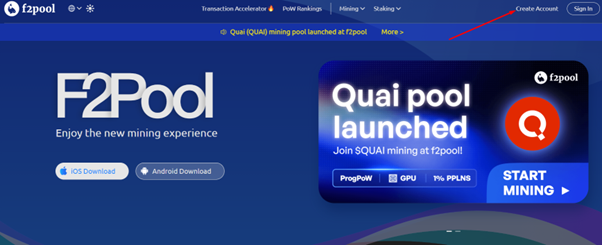
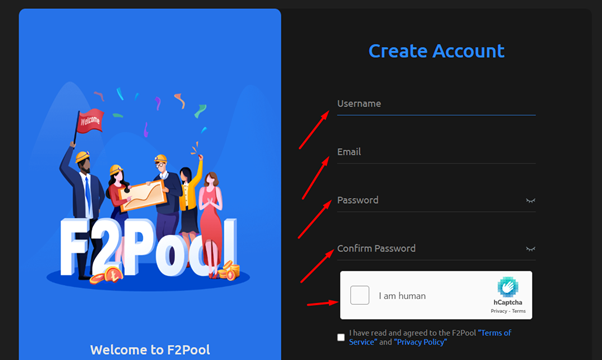

Hardware and Software Configuration F2Pool
Begin by assembling equipment and ensuring it is properly connected to a power source. Once powered on, establish a network connection for your machines.
Make sure your computer is connected to the same local area network (LAN) as your mining devices. This allows PC to communicate with the equipment seamlessly.
Use your PC to search for the IP address of each asic on the network. This step is crucial for accessing the configuration settings.
Open a web browser on your PC and enter the hardware’s IP address to log into its configuration page. This interface allows you to adjust settings.
Follow the instructions provided in our Miner Configuration Example to set up your miners correctly. Ensure all parameters are entered accurately.
After configuring, save the changes and apply them. The hardware will restart using the new settings, and you should wait until the hashrate is displayed, indicating that the equipment functioning properly.
F2Pool Fees and Payment Methods
F2Pool Fees: Everything You Need to Know
To estimate your potential income, you can utilize the F2Pool calculator. What makes F2Pool particularly attractive is its flexible fee structure and multiple payment methods that cater to different mining strategies.
Payment Methods and Commission Rates
F2Pool offers three main payout systems:
FPPS (Full Pay Per Share) – participants earn from both block rewards and transaction fees. This method offers predictable earnings and includes a 4% fee for Bitcoin mining.
PPS (Pay Per Share) – miners receive fixed rewards based on shares contributed. This system features varying fees across different coins: 3% for Bitcoin Cash, 4% for Litecoin, while EthereumPoW and Ethereum Classic charge only 1%.
PPLNS (Pay Per Last N Shares) – rewards depend on the pool’s recent performance, with a lower 2% fee for Bitcoin mining, making it attractive for those seeking potentially higher returns.
Choosing the Right Strategy
For miners prioritizing stability, FPPS/PPS methods provide consistent income – perfect for large-scale operations. Bitcoin’s FPPS at 4% ensures predictable returns, while Litecoin’s PPS at the same rate offers similar stability.
If you’re comfortable with variability for potentially higher rewards, PPLNS with its 2% Bitcoin fee might be your choice. This system particularly benefits small-scale miners who can tolerate fluctuations for better long-term gains.
Mid-range options like Bitcoin Cash at 3% and Zcash at 3% provide a balance between cost and performance, while the most affordable options like EthereumPoW and Ethereum Classic at 1% offer maximum cost efficiency.
In summary: F2Pool’s diverse payout systems with fees ranging from 1% to 4% ensure every miner can find the optimal balance between risk and reward, whether you’re a large operation seeking stability or an individual miner maximizing returns.
F2Pool Payouts
F2Pool automatically distributes earnings to your internal wallet on a daily basis, provided your balance meets or exceeds the minimum payout threshold for each specific coin.
Payout Thresholds by Coin
The minimum payout requirements vary significantly across different cryptocurrencies:
Bitcoin has the most flexible structure with a default threshold of 0.005 BTC, while offering customizable options up to 5 BTC. Similarly, Ethereum Classic provides multiple choices starting from 0.1 ETC up to 50 ETC.
Most major coins maintain a consistent 0.1 coin threshold, including Bitcoin Cash, EthereumPoW, Dash, Zcash, and Horizen. Litecoin requires a slightly lower minimum of 0.02 LTC.
For smaller-cap coins, the thresholds are higher: both Siacoin and Nervos Network require 500 coins before processing automatic payments.
Payment Frequency and Flexibility
Once your accumulated earnings reach these minimum amounts, F2Pool processes payouts automatically every 24 hours. This daily distribution schedule ensures you receive your mining rewards promptly while minimizing transaction fees through batch processing.
The customizable thresholds for coins like Bitcoin and Ethereum Classic allow miners to optimize their payout strategy based on individual preferences – whether prioritizing frequent smaller payments or consolidating earnings for fewer, larger transactions.
Withdraw Earnings
To set up automatic BTC withdrawal, follow the instructions.
Click Account Settings.
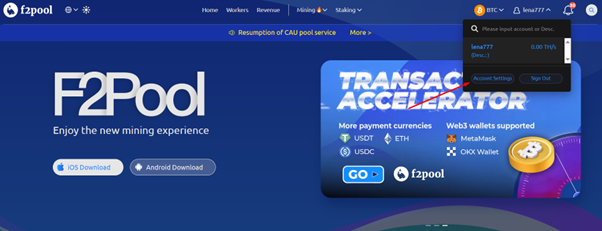
Activate 2FA authentication.
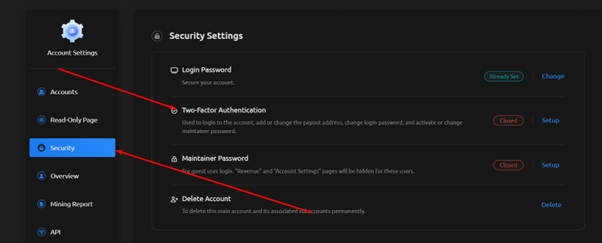
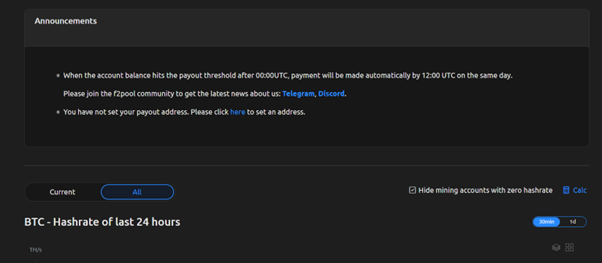
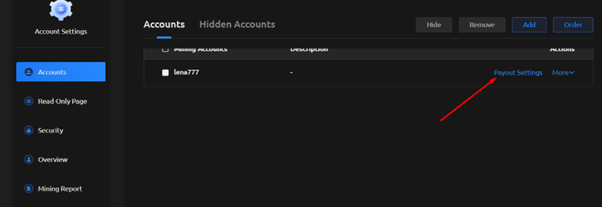
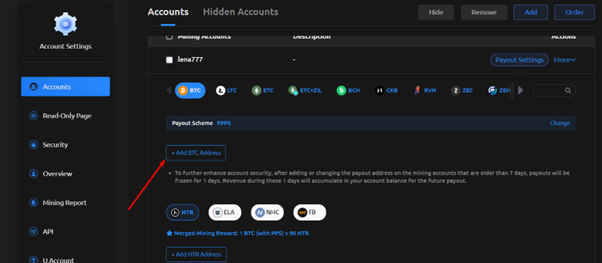
Go to the Accounts section, Payout Settings, click on the BTC icon, Add BTC Address.
Enter the BTC withdrawal address and the 2FA code.
A link to confirm the BTC address will be sent to the email provided during registration. The address will be confirmed within 24 hours.

F2Pool Mobile App: Features, Setup, and Download
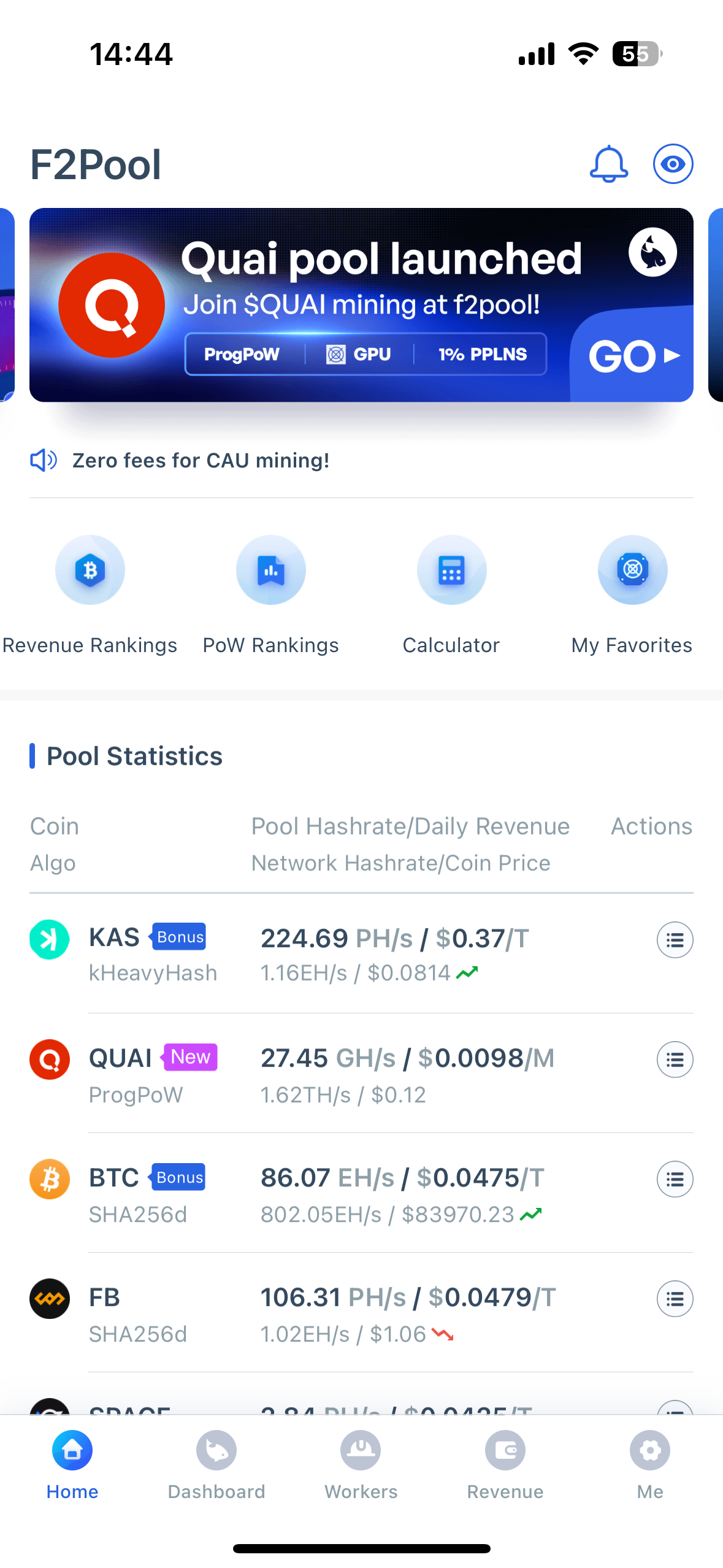

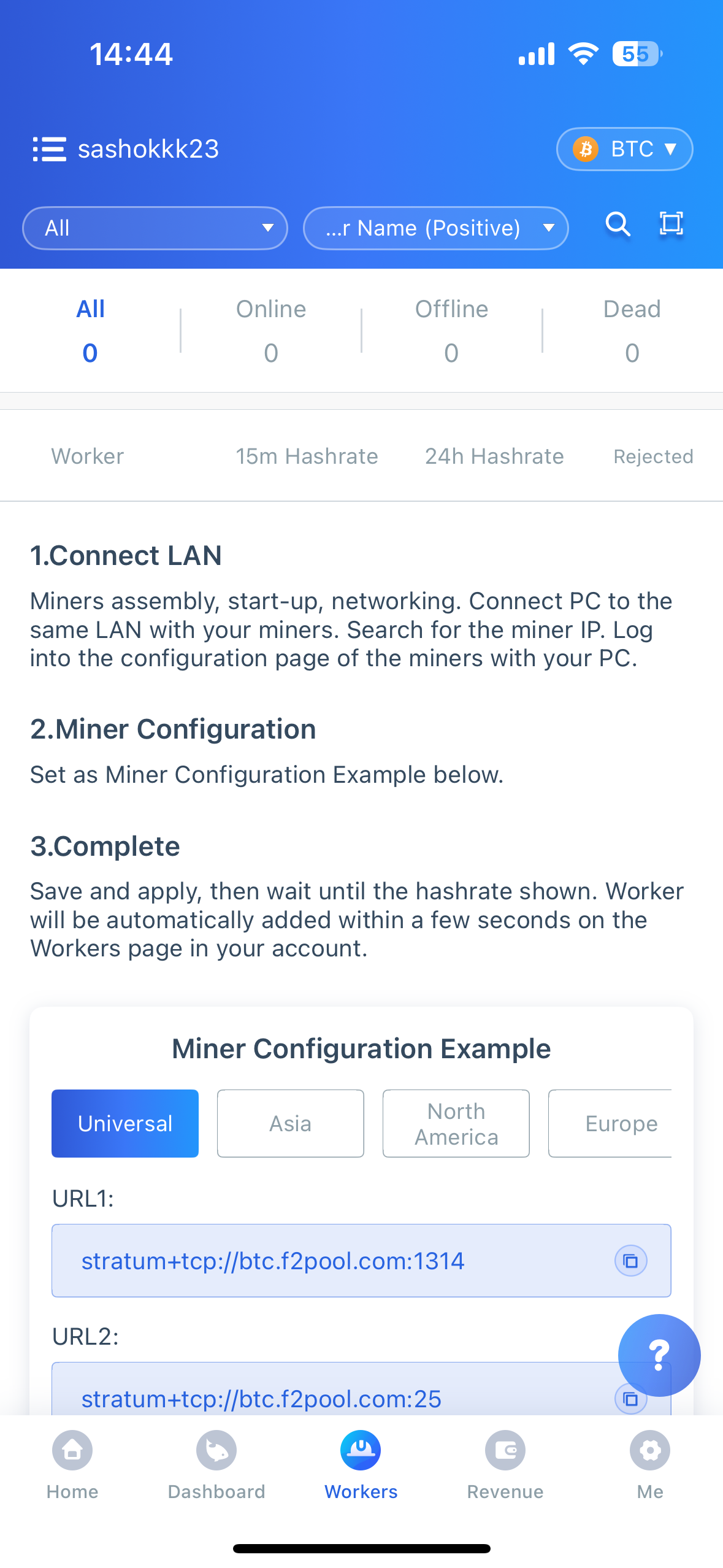
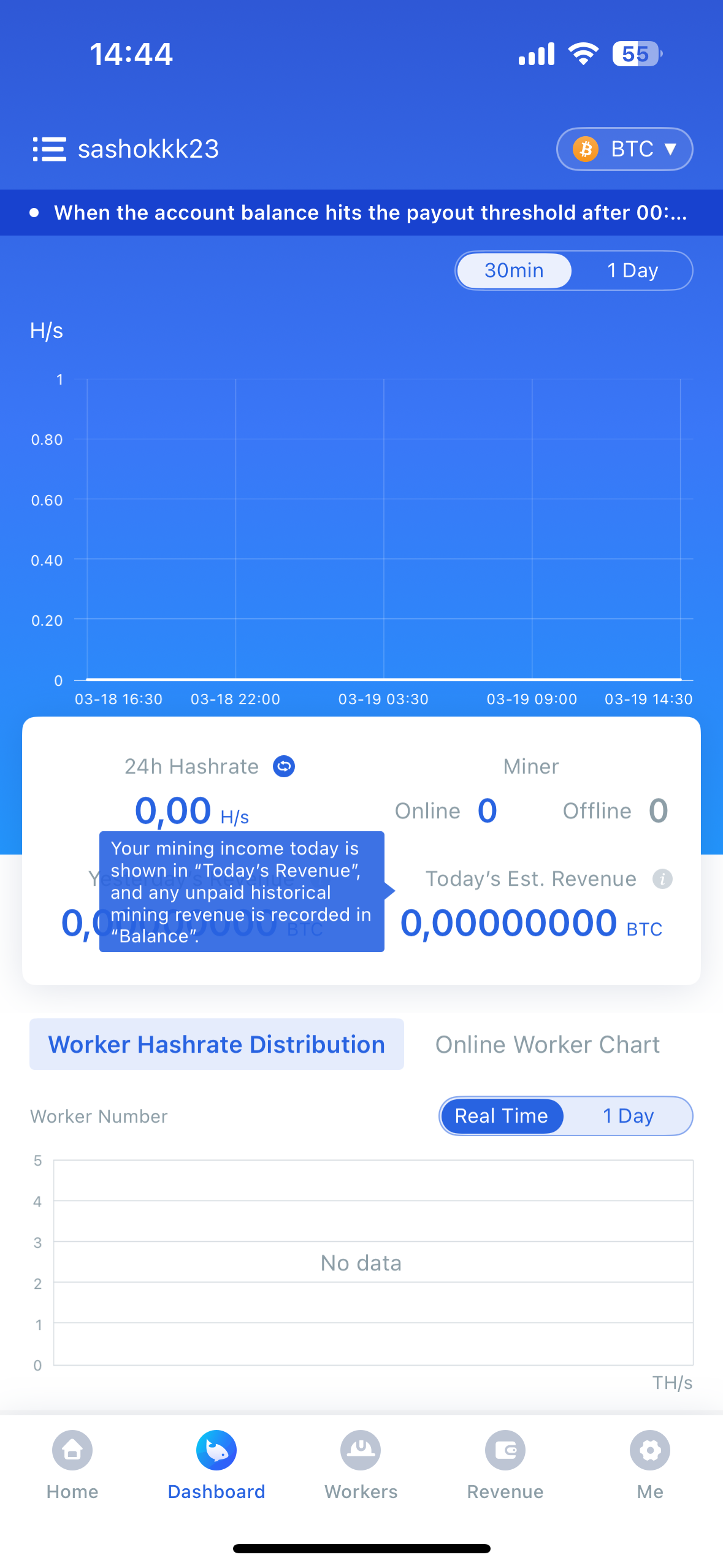
The F2Pool mobile application allows miners to monitor their operations in real time from anywhere. You can set up personalized notifications for critical updates, including hashrate fluctuations or successful payouts, ensuring you’re always connected to your mining activities.
Key Features
- Real-time Monitoring: Track performance metrics including hashrate, profitability, and equipment status
- Settings Management: Adjust mining settings, payout configurations, and equipment parameters directly from your phone
- Smart Notifications: Receive instant alerts about important events like hashrate drops, equipment failures, or completed payouts
- Detailed Statistics: View historical data with comprehensive profitability charts and difficulty change tracking
- Payout Customization: Configure withdrawal preferences, set limits, and select preferred coins for automatic payments
- Integrated Support: Access help resources and contact support directly through the app
- 24/7 Access: Monitor your mining operations around the clock, perfect for managing mining farms or checking progress on the go
- User-Friendly Interface: Simple and intuitive design that’s easy to navigate, even for beginners
Download and Setup
The F2Pool mobile app is available for both iOS and Android devices. You can download it from the official app stores and set up your account using your existing F2Pool credentials to start monitoring your mining operations immediately.
F2Pool Reviews
Peer-reviewed experiences provide the most accurate assessment. Learn what prospects this opportunity holds.
They quit letting you manually withdraw…
They quit letting you manually withdraw funds from your account! Before you could pay a withdrawal fee to get you un...
Super fairer Pool
Super fairer Pool. Die Auszahlung könnte bei BTC etwas niedriger liegen. Der Support ist Klasse.Schnelle Antwort. 5 S...Aucun probleme.
Aucun probleme.Gestion et supervision des asics facile.Paiement en temps et en heure.
trusted
this is so Goat the Goat
Mohammadmn82.cloudflare.com
Mohammadmn82.Workers.dev
Not Trustworthy - F2Pool Engages in Censorship
I recently discovered something troubling about F2Pool. They're now filtering transactions based on US Office of Fore...
I compared the pool with another pool…
I compared the pool with another pool and there was a sicnificant differance. F2pool payed 15% less then the other po...They are the best
They are the best. So trustworthy, user friendly and offer the best mining servicesVery good and satisfying
I was mining at litecoin pool.You can…
I was mining at litecoin pool.You can automaticly cash out when you reach 0,02 ltc and 50 doge.I finished after few d...f2 pool minning group is the worst…
f2 pool minning group is the worst company ever. i first traded with them 500$ and ones my withdraw day came they sai...This business is solely responsible for…
This business is solely responsible for the crypto market manipulation. If you are part of this operation, you should...
Best & most trustfull Pool worldwide of…
Best & most trustfull Pool worldwide of course they are Chinese they pay big rewards, and you get pay for coins you h...
Biggest and most trustfull pool…
Biggest and most trustfull pool worldwide mine with them with your eyes closed...perfect companyFAQ
Yes, F2Pool is one of the world’s oldest and most reputable mining pools, established in 2013, making it a completely legitimate and trusted platform.
F2Pool’s fees vary by cryptocurrency, typically ranging from 1% to 4%, with specific rates clearly displayed for each coin in your dashboard.
After registering on their website, add workers and configure your miners using the provided stratum addresses specific to your chosen cryptocurrency.
Minimum payout amounts vary by coin, from 0.005 BTC for Bitcoin to 500 coins for smaller cryptocurrencies like Siacoin, with daily automatic distributions.
Yes, F2Pool supports solo mining for several cryptocurrencies, allowing experienced miners to mine blocks independently while using the pool’s infrastructure.
F2Pool’s mobile application is available for both iOS and Android devices through their respective official app stores.
Stratum addresses follow the format stratum+tcp://[coin].f2pool.com:[port], with specific addresses provided for each cryptocurrency in your dashboard.
The calculator estimates your earnings based on current network difficulty, pool fees, electricity costs, and your equipment’s hashrate for accurate projections.
Why Choose F2Pool?
The pool stands out as a dependable platform. Your payouts are secure, with funds transferred reliably to your chosen wallet or exchange.